Usage Tutorial
Configuring Costmaps
Configuring of costmaps is pretty similar to the navigation stack. CoHAN offers two extra layers (Human Static and Visible) that adds more safety and legibility to the robot’s plan. Here is how you add them to the costmap (either local or global):
plugins:
  - {name: human_layer_static, type: "cohan_layers::StaticAgentLayer"}
  - {name: human_layer_visible, type: "cohan_layers::AgentVisibilityLayer"}

human_layer_static:
  robot_radius: 0.25
  agent_radius: 0.3
Please edit the robot_radius and agent_radius appropriately. Example YAML files for configuration can be found in global_costmap_params.yaml and local_costmap_params.yaml.
Configuring move_base and HATEBLocalPlanner
The optimal settings for the move_base that work with CoHAN are given below:
planner_frequency: 5.0
controller_frequency: 10.0
planner_patience: 5.0
controller_patience: 15.0
recovery_behavior_enabled: false
You can tweek these a little but make sure that the planner_frequency is always less than controller_frequency as it causes issues with move_base. Make sure recovery_behavior_enabled is set to false to stop move_base from interfering with recovery behaviors in CoHAN.
For HATEB_Local_PLanner, there are several parameters. Here we show some important ones:
## Planning Mode
planning_mode: 1 #(0: robot navigation wuth no human planning. 1: human-aware planning)

## Robot Params (there are several others as well to set robot model completely -> check example files)
holonomic_robot: false #(for a differential drive robot)
type: 0 #(0: Robot, 1: Human)
robot_radius: 0.4

# Agents (humans) and HATEB
## Agent Model Params
agent_radius: 0.30
max_agent_vel_x: 1.3
max_agent_vel_y: 0.4
max_agent_vel_x_backwards: 0.01
max_agent_vel_theta: 1.1
agent_acc_lim_x: 0.6
agent_acc_lim_y: 0.3
agent_acc_lim_theta: 0.8
## HATEB Params (activate all constraints and set thresholds (these are defaults for a good performance))
use_agent_agent_safety_c: True
use_agent_robot_safety_c: True
use_agent_robot_rel_vel_c: True
use_agent_robot_visi_c: True
add_invisible_humans: True
min_agent_agent_dist: 0.4
min_agent_robot_dist: 0.6
rel_vel_cost_threshold: 1.5
visibility_cost_threshold: 2.5
invisible_human_threshold: 1.0

# Optimization weights (Since it is based on teb, there are lot more parameters -> check example files and teb_local_planner)
weight_agent_robot_safety: 5.0
weight_agent_agent_safety: 2.0
weight_agent_robot_rel_vel: 5.0
weight_agent_robot_visibility: 5.0
weight_invisible_human: 1.0
Look at move_base_params.yaml and hateb_local_params.yaml for full example configuration.
Required Topics
We assume that the robot has good tf and well localized in the environment (map). The following topics are required for the system to work properly:
/tracked_agents
/odom
/base_scan (laser scan topic for obstacle layer)
/joint_states
The /tracked_agents topic uses a custom message TrackedAgents. Other topics are standard ROS topics. An example script publishing tracked_agents topic can be found in agents_bridge.py.
Launch file for Visible and Invisible Agents in CoHAN2.0
Along with the node publishing tracked agents, you need to launch prediction and filter nodes befor you launch move_base node. Add the following to a launch file named agents.launch.
<launch>
    <arg name="num_agents" default="1"/>

    <!-- Sim agents to /tracked_agents -->
    <node name="agents" pkg="cohan_sim_navigation" type="agents_bridge.py" args="$(arg num_agents)" output="screen"/>

    <!-- agent pose prediction, for the local-planning -->
    <node pkg="agent_path_prediction" type="agent_path_predict" name="agent_path_predict" output="screen" >
        <param name="goals_file" value="$(find agent_path_prediction)/cfg/goals_adream.yaml"/>
    </node>

    <!-- Add the invisible humans detection node -->
    <node pkg="invisible_humans_detection" type="invisible_humans_detection_node" name="map_scanner" output="screen"/>

</launch>
Launch file for move_base node with CoHAN2.0
We will now load the appropriate parameters and launch the move_base node with HATEBLocalPlanner. The following is an example launch file that does this. You can change the bt_xml argument to load different behavior trees. Add the following to a launch file named move_base_cohan.launch.
<launch>
    <arg name="node_start_delay" default="4.0" />
    <arg name="bt_xml" default="all_modes.xml"/>

    <!-- move_base node with hateb -->
    <node pkg="move_base" type="move_base" name="move_base" output="screen" launch-prefix="bash -c 'sleep $(arg node_start_delay); $0 $@' ">
        <param name="base_global_planner" value="global_planner/GlobalPlanner" />
        <param name="base_local_planner" value="hateb_local_planner/HATebLocalPlannerROS" />
        <param name="GlobalPlanner/allow_unknown" value="true" />
        <param name="bt_xml_path"  value="$(find hateb_local_planner)/behavior_trees/$(arg bt_xml)"/>
        <param name="use_simulated_fov" value="true" />

        <rosparam file="$(find cohan_sim_navigation)/config/move_base_params.yaml" command="load" />
        <rosparam file="$(find cohan_sim_navigation)/config/robot/global_costmap_params.yaml" command="load" ns="global_costmap"/>
        <rosparam file="$(find cohan_sim_navigation)/config/robot/local_costmap_params.yaml" command="load" ns="local_costmap"/>
        <rosparam file="$(find cohan_sim_navigation)/config/robot/hateb_local_planner_params.yaml" command="load" ns="HATebLocalPlannerROS" />
    </node>
</launch>
Putting everything together (using a simulated robot)
Here is an example launch file that launches everything together (check cohan_simple.launch):
<launch>
    <arg name="node_start_delay" default="4.0" />
    <arg name="bt_xml" default="all_modes.xml"/>
    <arg name="num_agents" default="1"/>

    <!-- Use sim time for simulator -->
    <param name="/use_sim_time" value="true"/>

    <!-- Launch Simulator -->
    <node name="cohan_sim" pkg="cohan_sim" type="simros_node" args="-g $(find cohan_sim_navigation)/maps/laas.yaml" output="screen"/>

    <!-- start map_server -->
    <node name="map_server" pkg="map_server" type="map_server" args="$(find cohan_sim_navigation)/maps/laas.yaml"/>

    <!-- Localize the robot -->
    <node pkg="fake_localization" type="fake_localization" name="fake_localization" respawn="true" output="screen">
        <param name="global_frame_id" value="map" />
    </node>

    <!-- Launch agents nodes-->
    <include file="$(find cohan_sim_navigation)/launch/agents.launch">
        <arg name="num_agents" value="$(arg num_agents)"/>
    </include>

    <!-- Launch move_base node with hateb -->
    <include file="$(find cohan_sim_navigation)/launch/move_base_cohan.launch">
        <arg name="bt_xml" value="$(arg bt_xml)"/>
        <arg name="node_start_delay" value="$(arg node_start_delay)"/>
    </include>

    <!-- Start RViZ -->
    <node name="rviz" pkg="rviz" type="rviz" args="-d $(find cohan_sim_navigation)/rviz/cohan_sim.rviz" />
</launch>
Run CoHAN2.0 on the simulated robot
Launch simulator and move_base with CoHAN2.0. If you are usinf a Docker, run these inside the container.
roslaunch cohan_tutorial cohan_simple.launch
Launch teleop_keyboard to control human.
rosrun teleop_twist_keyboard teleop_twist_keyboard.py cmd_vel:=/human1/cmd_vel
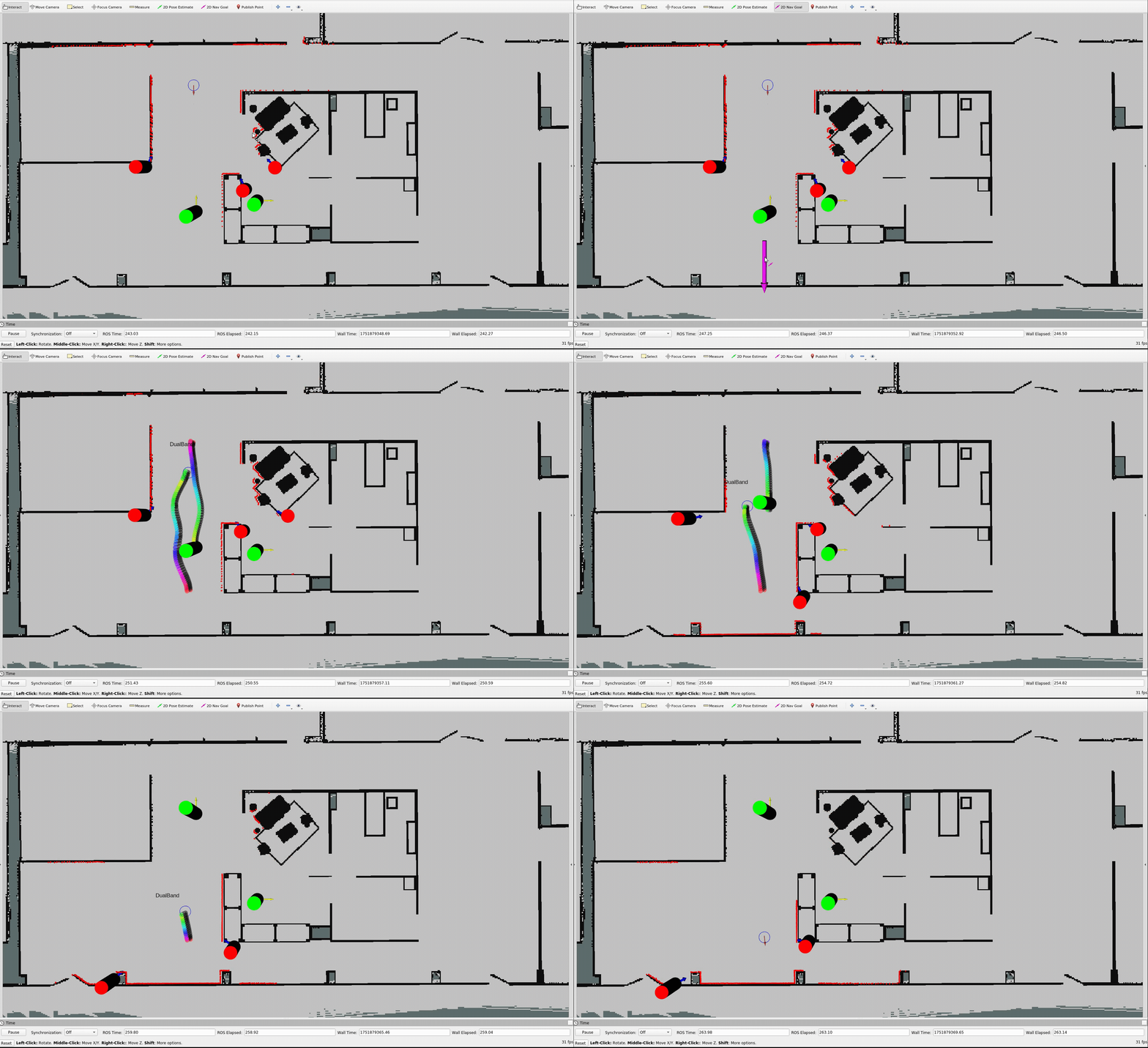
Give a goal to the robot and move the human using the teleop_keyboard. If everything went well you should be able to see this!